📌 What is IMS (Invoice Management System)?
WHAT IS IMS (INVOICE MANAGEMENT SYSTEM)? A new GST portal feature enabling taxpayers to manage invoice corrections, amendments & ITC claims efficiently. 🚀
✅ 🌟 Purpose of IMS (Invoice Management System) 🌟
The Invoice Management System (IMS) is designed to streamline the invoice reconciliation process for taxpayers, ensuring accuracy in GST filings and Input Tax Credit (ITC) 🏦 claims. It acts as a structured communication bridge 🌉 between suppliers and recipients, enhancing transparency 🔍 and minimizing tax discrepancies ❌.
✔️ Seamless Invoice Matching 📄
📌 IMS helps taxpayers effortlessly match their invoices with those issued by suppliers.
📌 Ensures that details reported in 📑 GSTR-1 align with the recipient’s records.
📌 Reduces errors ⚠️ in tax filings and compliance issues.
✔️ Ensuring Correct ITC Claims 💰
🏦 Helps taxpayers claim only the correct and eligible ITC.
🛡️ Prevents penalties, interest, and audits 🚫💸 due to mismatched invoices.
✅ Accurate invoice matching before ITC claims in 📊 GSTR-3B.
🔄 Action-Based Control: Accept ✅ | Reject ❌ | Pending ⏳
✔️ ✅ Accept: Moves to available ITC in GSTR-2B.
✔️ ❌ Reject: Eliminates incorrect ITC claims.
✔️ ⏳ Keep Pending: Allows future verification before final action.
This system enhances compliance 📜, reduces tax disputes ⚖️, and ensures a smooth GST process 🔄. 🚀
🔄 Flow of IMS:
All outward supplies reported in 📑 GSTR-1 / 🗂️ IFF / 📜 1A will populate in the IMS dashboard for recipients to take action.
🔹 ✅ Accept: Moves to ‘ITC Available’ section of GSTR-2B, and ITC is auto-populated in GSTR-3B.
🔹 ❌ Reject: Moves to ‘ITC Rejected’ section of GSTR-2B. ITC will not be auto-populated in GSTR-3B.
🔹 ⏳ Pending: Stays on IMS dashboard until accepted or rejected. Not included in GSTR-2B or GSTR-3B.
📌 Pending action is NOT allowed for:
🚫 Original Credit Notes
🚫 Upward amendment of Credit Note (regardless of previous action)
🚫 Downward amendment of Credit Note if original was rejected
🚫 Downward amendment of Invoice/Debit Note if original was accepted and GSTR-3B was filed
🔑 Key Points on IMS:
💡 Deemed Accepted: If no action is taken by the time of GSTR-2B generation, the record will be considered as ‘Deemed Accepted’.
📅 Mandatory Recompute: If action is taken after the 14th of the month (GSTR-2B generation date), taxpayers must recompute GSTR-2B from the IMS dashboard.
❌ Supplies that won’t go to IMS but directly to GSTR-3B:
🔹 RCM Supplies (if reported in Table 4B of GSTR-1/IFF)
🔹 Ineligible ITC due to Section 16(4) or POS rule
📌 Records flow to IMS at the time of saving by supplier, but they appear in GSTR-2B only after the supplier files GSTR-1/IFF/1A.
🔄 Accepted / Deemed Accepted / Rejected records move out of IMS after GSTR-3B is filed.
🔄 Pending records stay in IMS and can be accepted or rejected in future months.
📢 Important Compliance Rules:
⚠️ Action on original record must be taken before action on amended record (if different return periods).
⚠️ If a supplier modifies an invoice before filing GSTR-1/IFF, the record status on IMS resets.
⚠️ Sequential GSTR-2B generation: GSTR-3B of the previous period must be filed first!
🔥 Impact on Supplier’s Liability:
📈 Supplier’s liability in GSTR-3B increases for invoices rejected by the recipient in IMS for the following cases:
❌ Original Credit Note rejected
❌ Upward amendment of Credit Note rejected
❌ Downward amendment of Credit Note rejected (if original was rejected earlier)
❌ Downward amendment of Invoice/Debit Note rejected (if original was accepted & GSTR-3B filed)
📌 For More Details: 🔗 Click Here
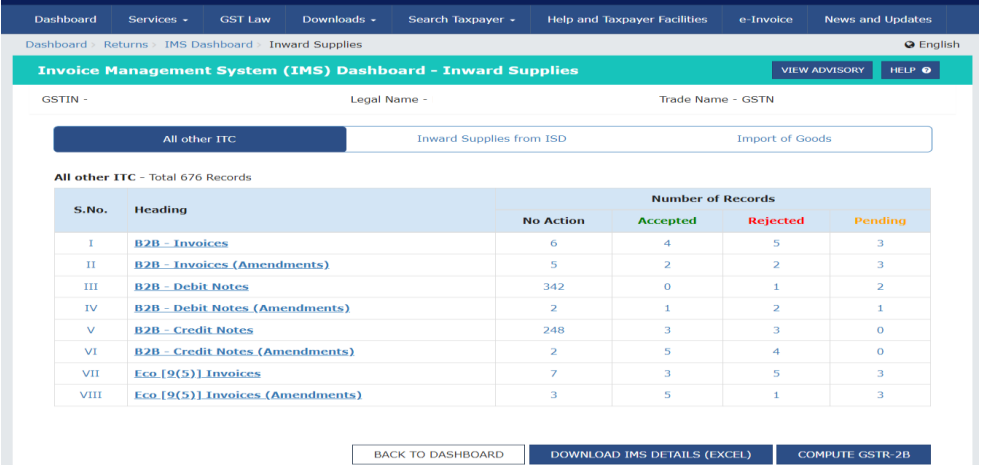
📸 Below is a screenshot of the IMS dashboard showing a summary of all inward records and actions taken. This IMS Dashboard Button is Visible in Return Section of GST Portal after Login.